Case Studie
Promotion Optimization
My process was based on Design Thinking, with numerous iterations in between.
Communication with end-users and stakeholders was direct, which led to multiple iterations between Empathize, Define, and Ideate phases.
Below are more details about each of these steps.

Case Studie
Promotion Optimization
My process was based on Design Thinking, with numerous iterations in between.
Communication with end-users and stakeholders was direct, which led to multiple iterations between Empathize, Define, and Ideate phases.
Below are more details about each of these steps.
Case Studie
Promotion Optimization
My process was based on Design Thinking, with numerous iterations in between.
Communication with end-users and stakeholders was direct, which led to multiple iterations between Empathize, Define, and Ideate phases.
Below are more details about each of these steps.
Scroll to see the whole process 😉

Empathy
At the beginning of the process, I focused on understanding the current problem and solution. From this discovery phase and conversations with previous users, initial conclusions emerged, leading to the project's objectives:
Outcome Enthusiastics
Users were enthusiastic about the outcomes; they reported being very pleased with the intelligence behind the product.
Very Uncomfortable
They were encountering significant discomfort due to a poor user experience. They were not fully utilizing the platform, instead performing specific tasks and using bulk upload functionalities to manage tasks in other software (such as Excel) before transferring them to the platform to leverage its intelligence and results.
Limited Flexibility
The users had numerous ideas to enhance the platform, which would significantly optimize their daily routines. However, there was little to no time dedicated to listening and implementing these ideas.
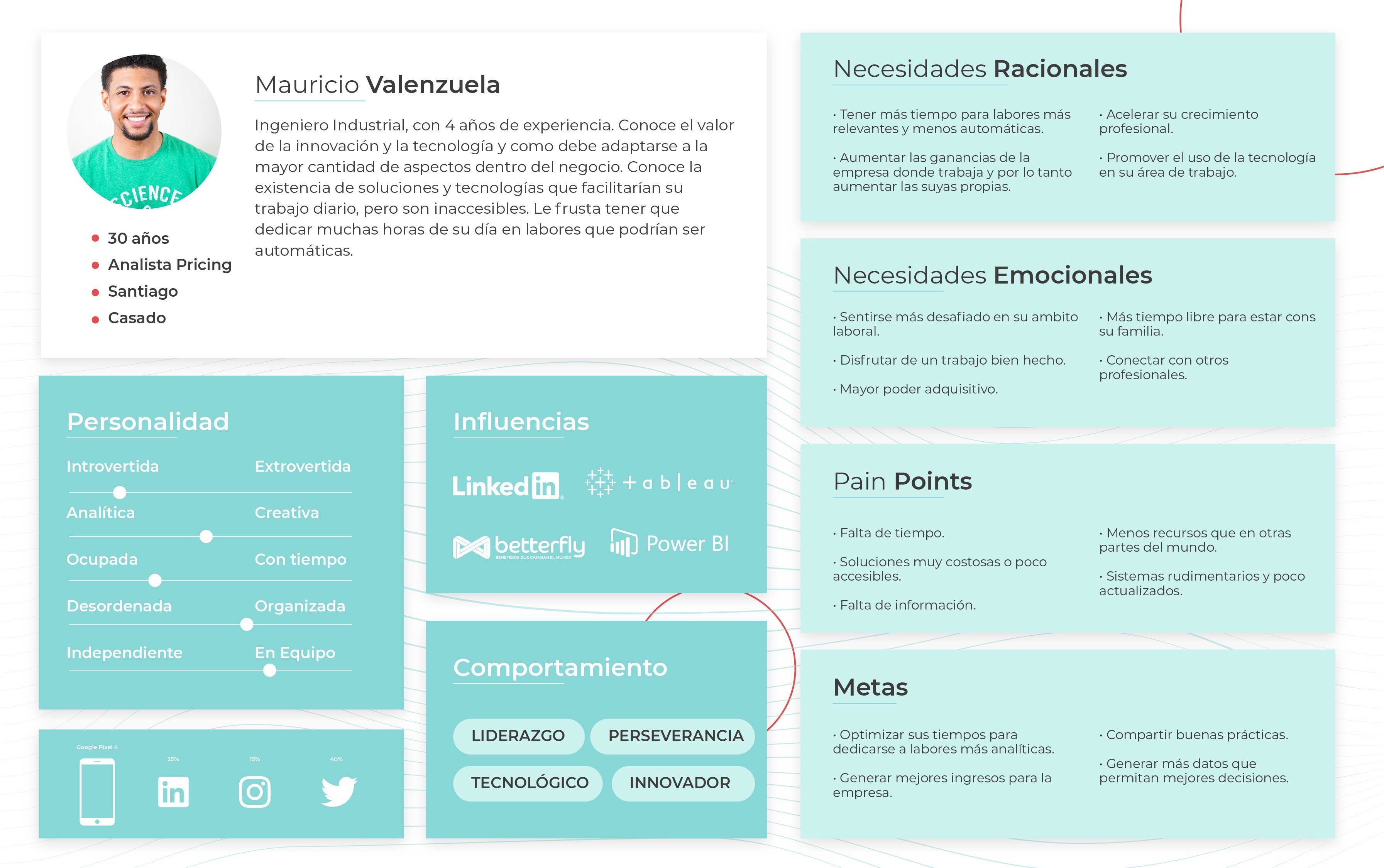
Simultaneously, I developed a User Persona to keep in mind while designing, based on current users, potential users, and some assumptions due to limited time and research efforts.
Empathy
At the beginning of the process, I focused on understanding the current problem and solution. From this discovery phase and conversations with previous users, initial conclusions emerged, leading to the project's objectives:
Outcome Enthusiastics
Users were enthusiastic about the outcomes; they reported being very pleased with the intelligence behind the product.
Very Uncomfortable
They were encountering significant discomfort due to a poor user experience. They were not fully utilizing the platform, instead performing specific tasks and using bulk upload functionalities to manage tasks in other software (such as Excel) before transferring them to the platform to leverage its intelligence and results.
Limited Flexibility
The users had numerous ideas to enhance the platform, which would significantly optimize their daily routines. However, there was little to no time dedicated to listening and implementing these ideas.
Simultaneously, I developed a User Persona to keep in mind while designing, based on current users, potential users, and some assumptions due to limited time and research efforts.
Empathy
At the beginning of the process, I focused on understanding the current problem and solution. From this discovery phase and conversations with previous users, initial conclusions emerged, leading to the project's objectives:
Outcome Enthusiastics
Users were enthusiastic about the outcomes; they reported being very pleased with the intelligence behind the product.
Very Uncomfortable
They were encountering significant discomfort due to a poor user experience. They were not fully utilizing the platform, instead performing specific tasks and using bulk upload functionalities to manage tasks in other software (such as Excel) before transferring them to the platform to leverage its intelligence and results.
Limited Flexibility
The users had numerous ideas to enhance the platform, which would significantly optimize their daily routines. However, there was little to no time dedicated to listening and implementing these ideas.
Simultaneously, I developed a User Persona to keep in mind while designing, based on current users, potential users, and some assumptions due to limited time and research efforts.

Defining the Goals
After conversing and empathizing with various users, and in pursuit of finding solutions that would benefit both them and the company's business objectives, we decided to focus on the following goals.
Improve User Experience
The fundamental and primary focus of this new phase of PB. We cannot learn anything from our users if we start from an experience filled with errors, bad practices, and poor functionality.
We identified several key points to address in this aspect:
Poor structure: The patterns used in various sections of the platform did not allow easy access to all the available information. This had a negative impact on the platform's strongest aspects, such as the intelligence that provides highly relevant results for the user.
Specific Usage: The discomfort caused by incorrect patterns, coupled with excessively long loading times, insufficient feedback from the platform regarding errors and next steps, among other issues, led users to interact with PB as little as possible. They organized their work using other applications and only used PB for specific tasks that delivered the desired results, which were then exported from the platform. This pattern could potentially result in future abandonment of the platform.
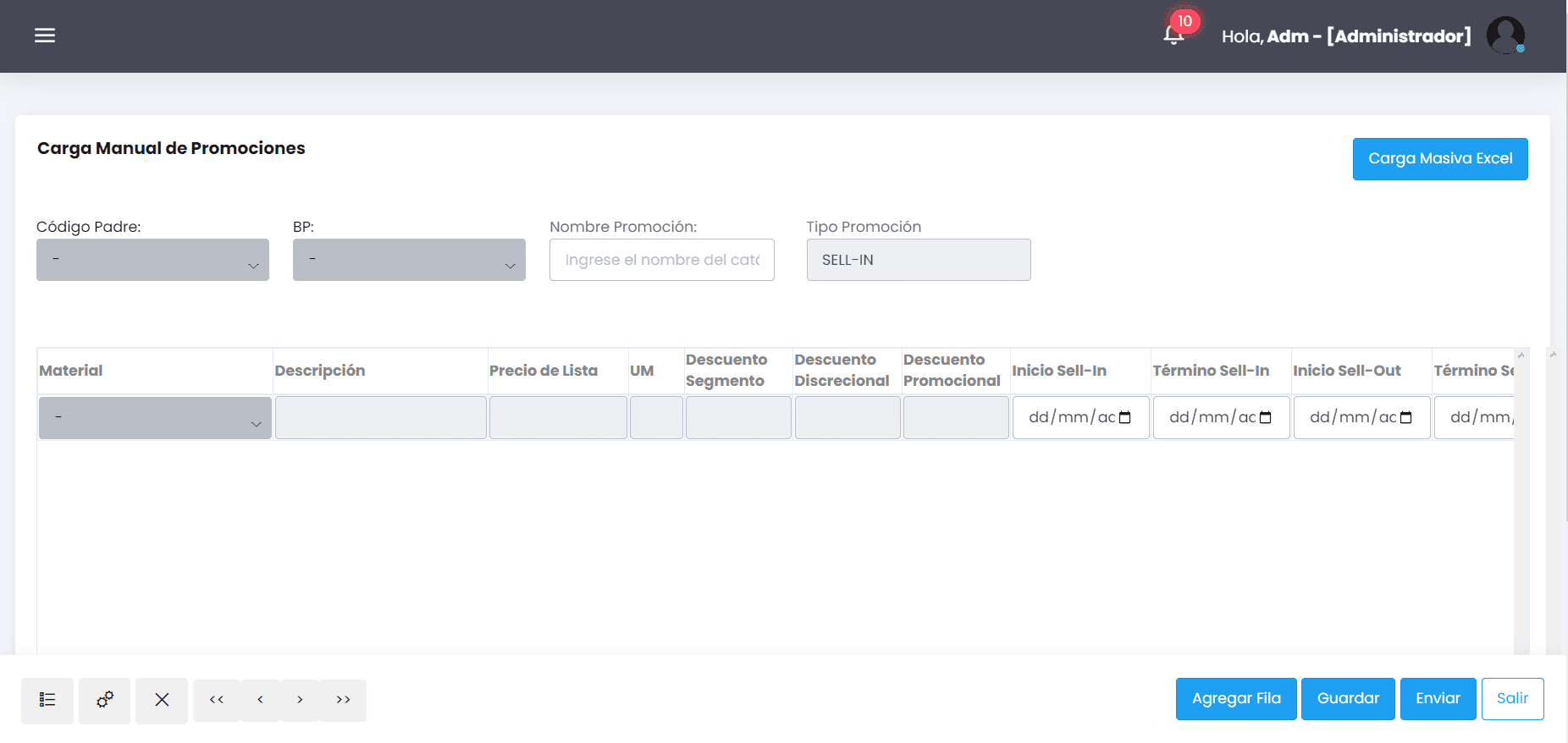
PB version 1
Standarize the Platform
While previous work had been customized for each client, there were many commonalities among them. The solution provided was the same, and the issues seemed to be quite similar.
Creating a foundational platform for all users would aim to achieve the following points:
Move in a Unified Direction: Taking insights, feedback, and observations from various users would enable us to test and filter potential effective solutions to recurring problems. This collaborative approach would lead us towards a more robust product.
Tested Solutions: Each new user would begin with a product that has already been tested and validated by other users facing similar issues and situations. This ensures a smoother product adoption process.
Starting Point for Development: A significant amount of time was being invested in creating specific platforms for each client. That same development time could be utilized for enhancements and features that would benefit a larger user base. Having a common starting point for developing PB for new users would allow the team's efforts to be distributed more effectively.
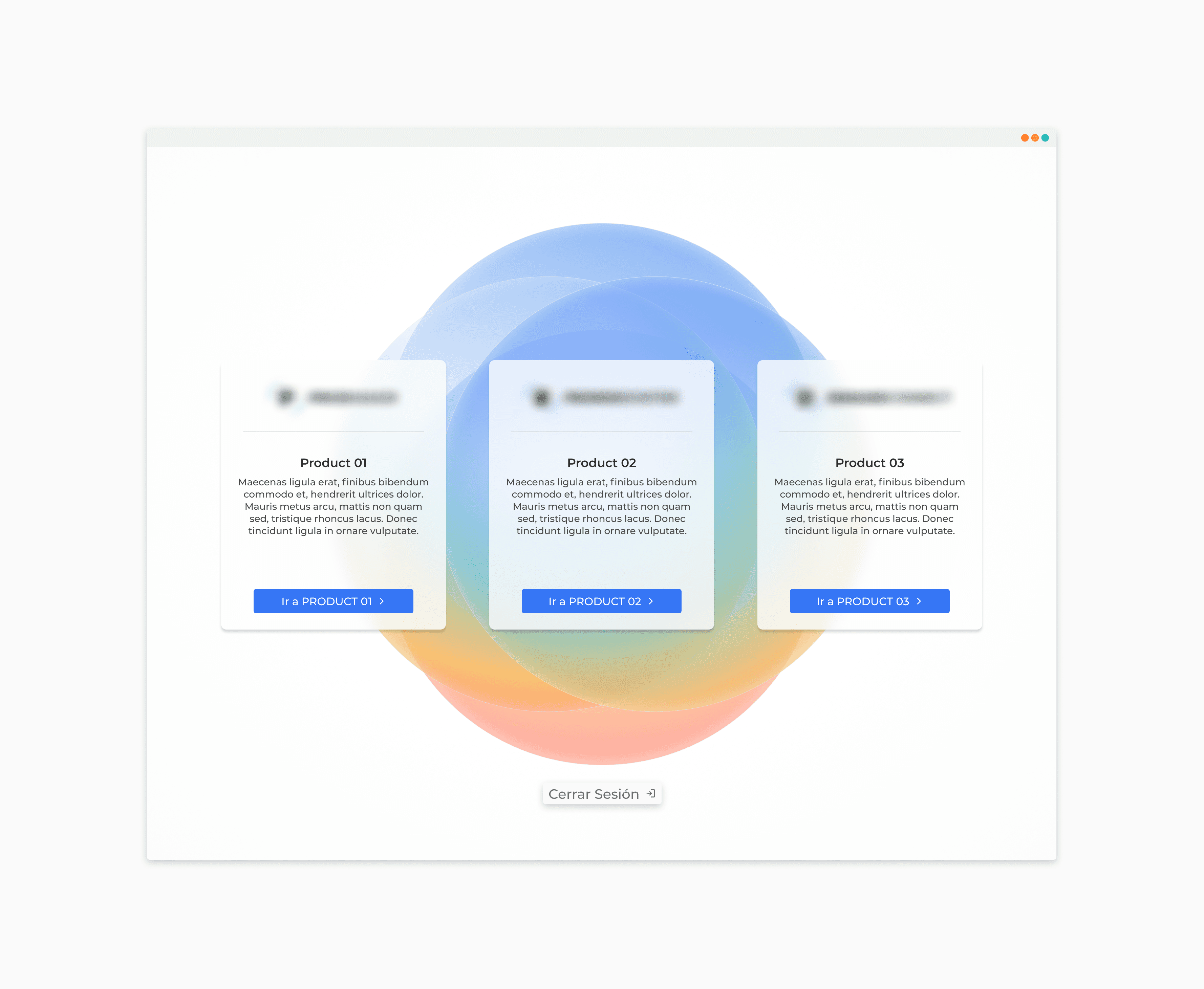
Delicate Transition
Users often resist change, even when it involves an improvement to their routine. Key functionalities for current users would be retained, even if they don't significantly contribute to the new platform. This is done to make the transition process as user-friendly as possible for existing users.
Defining the Goals
After conversing and empathizing with various users, and in pursuit of finding solutions that would benefit both them and the company's business objectives, we decided to focus on the following goals.
Improve User Experience
The fundamental and primary focus of this new phase of PB. We cannot learn anything from our users if we start from an experience filled with errors, bad practices, and poor functionality.
We identified several key points to address in this aspect:
Poor structure: The patterns used in various sections of the platform did not allow easy access to all the available information. This had a negative impact on the platform's strongest aspects, such as the intelligence that provides highly relevant results for the user.
Specific Usage: The discomfort caused by incorrect patterns, coupled with excessively long loading times, insufficient feedback from the platform regarding errors and next steps, among other issues, led users to interact with PB as little as possible. They organized their work using other applications and only used PB for specific tasks that delivered the desired results, which were then exported from the platform. This pattern could potentially result in future abandonment of the platform.
PB version 1
Standarize the Platform
While previous work had been customized for each client, there were many commonalities among them. The solution provided was the same, and the issues seemed to be quite similar.
Creating a foundational platform for all users would aim to achieve the following points:
Move in a Unified Direction: Taking insights, feedback, and observations from various users would enable us to test and filter potential effective solutions to recurring problems. This collaborative approach would lead us towards a more robust product.
Tested Solutions: Each new user would begin with a product that has already been tested and validated by other users facing similar issues and situations. This ensures a smoother product adoption process.
Starting Point for Development: A significant amount of time was being invested in creating specific platforms for each client. That same development time could be utilized for enhancements and features that would benefit a larger user base. Having a common starting point for developing PB for new users would allow the team's efforts to be distributed more effectively.
Delicate Transition
Users often resist change, even when it involves an improvement to their routine. Key functionalities for current users would be retained, even if they don't significantly contribute to the new platform. This is done to make the transition process as user-friendly as possible for existing users.
Defining the Goals
After conversing and empathizing with various users, and in pursuit of finding solutions that would benefit both them and the company's business objectives, we decided to focus on the following goals.
Improve User Experience
The fundamental and primary focus of this new phase of PB. We cannot learn anything from our users if we start from an experience filled with errors, bad practices, and poor functionality.
We identified several key points to address in this aspect:
Poor structure: The patterns used in various sections of the platform did not allow easy access to all the available information. This had a negative impact on the platform's strongest aspects, such as the intelligence that provides highly relevant results for the user.
Specific Usage: The discomfort caused by incorrect patterns, coupled with excessively long loading times, insufficient feedback from the platform regarding errors and next steps, among other issues, led users to interact with PB as little as possible. They organized their work using other applications and only used PB for specific tasks that delivered the desired results, which were then exported from the platform. This pattern could potentially result in future abandonment of the platform.
PB version 1
Standarize the Platform
While previous work had been customized for each client, there were many commonalities among them. The solution provided was the same, and the issues seemed to be quite similar.
Creating a foundational platform for all users would aim to achieve the following points:
Move in a Unified Direction: Taking insights, feedback, and observations from various users would enable us to test and filter potential effective solutions to recurring problems. This collaborative approach would lead us towards a more robust product.
Tested Solutions: Each new user would begin with a product that has already been tested and validated by other users facing similar issues and situations. This ensures a smoother product adoption process.
Starting Point for Development: A significant amount of time was being invested in creating specific platforms for each client. That same development time could be utilized for enhancements and features that would benefit a larger user base. Having a common starting point for developing PB for new users would allow the team's efforts to be distributed more effectively.
Delicate Transition
Users often resist change, even when it involves an improvement to their routine. Key functionalities for current users would be retained, even if they don't significantly contribute to the new platform. This is done to make the transition process as user-friendly as possible for existing users.
Ideate
We restructured the user experience on the platform, leveraging its technical foundation, while keeping the previous version for existing clients and launching the new version for new clients. This approach allowed us to compare both versions.I collaborated with different roles to validate schemes and designs, holding regular meetings to align with business objectives and gather feedback from stakeholders.
This iterative approach, focusing on collaboration, feasibility, and continuous feedback, enabled us to create a user-centric platform aligned with goals. We addressed issues and made informed decisions throughout the process.
Journey Map
I developed a Journey Map based on user needs, allowing myself some liberties to make assumptions about how users' emotional responses would be at each step. This Journey Map serves as a guide to how we would like the application to function.
You can use the mouse to move horizontally and view all the steps and profiles involved.
In this case, I considered three key profiles defined by different users: Editor, Approver, and Negotiator.
The Editor is the user who creates promotions and submits them for review.
The Approver receives proposals from the Editor and ensures they align with the pricing team's objectives.
The Negotiator presents the proposal to the respective clients and strives to secure a positive response.
Promotions Flow
In the initial version of the project, there were around 8 phases through which the promotion moved. After conversing with users, it was understood that many of the phases were not being used as intended and were being skipped
Due to this, we condensed the phases into 4 key ones:
En Edición
The first phase where users structure the promotion.
En Revisión
Filter phase where users with higher authority must review and validate the proposal generated in the previous phase and decide whether it advances or not.
Negociación
The revised proposal is taken and negotiated with the respective client to determine if they wish to accept the promotion and proceed with it.
Ejecución
Phase where promotions are waiting to be executed. Once their corresponding dates are reached, they complete their cycle.
Wireframes
Before developing more detailed prototypes, I created several hand-drawn sketches and then low-fidelity wireframes to optimize work time.
Ideate
We restructured the user experience on the platform, leveraging its technical foundation, while keeping the previous version for existing clients and launching the new version for new clients. This approach allowed us to compare both versions.I collaborated with different roles to validate schemes and designs, holding regular meetings to align with business objectives and gather feedback from stakeholders.
This iterative approach, focusing on collaboration, feasibility, and continuous feedback, enabled us to create a user-centric platform aligned with goals. We addressed issues and made informed decisions throughout the process.
Journey Map
I developed a Journey Map based on user needs, allowing myself some liberties to make assumptions about how users' emotional responses would be at each step. This Journey Map serves as a guide to how we would like the application to function.
You can use the mouse to move horizontally and view all the steps and profiles involved.
In this case, I considered three key profiles defined by different users: Editor, Approver, and Negotiator.
The Editor is the user who creates promotions and submits them for review.
The Approver receives proposals from the Editor and ensures they align with the pricing team's objectives.
The Negotiator presents the proposal to the respective clients and strives to secure a positive response.
Promotions Flow
In the initial version of the project, there were around 8 phases through which the promotion moved. After conversing with users, it was understood that many of the phases were not being used as intended and were being skipped
Due to this, we condensed the phases into 4 key ones:
En Edición
The first phase where users structure the promotion.
En Revisión
Filter phase where users with higher authority must review and validate the proposal generated in the previous phase and decide whether it advances or not.
Negociación
The revised proposal is taken and negotiated with the respective client to determine if they wish to accept the promotion and proceed with it.
Ejecución
Phase where promotions are waiting to be executed. Once their corresponding dates are reached, they complete their cycle.
Wireframes
Before developing more detailed prototypes, I created several hand-drawn sketches and then low-fidelity wireframes to optimize work time.
Ideate
We restructured the user experience on the platform, leveraging its technical foundation, while keeping the previous version for existing clients and launching the new version for new clients. This approach allowed us to compare both versions.I collaborated with different roles to validate schemes and designs, holding regular meetings to align with business objectives and gather feedback from stakeholders.
This iterative approach, focusing on collaboration, feasibility, and continuous feedback, enabled us to create a user-centric platform aligned with goals. We addressed issues and made informed decisions throughout the process.
Journey Map
I developed a Journey Map based on user needs, allowing myself some liberties to make assumptions about how users' emotional responses would be at each step. This Journey Map serves as a guide to how we would like the application to function.
You can use the mouse to move horizontally and view all the steps and profiles involved.
In this case, I considered three key profiles defined by different users: Editor, Approver, and Negotiator.
The Editor is the user who creates promotions and submits them for review.
The Approver receives proposals from the Editor and ensures they align with the pricing team's objectives.
The Negotiator presents the proposal to the respective clients and strives to secure a positive response.
Promotions Flow
In the initial version of the project, there were around 8 phases through which the promotion moved. After conversing with users, it was understood that many of the phases were not being used as intended and were being skipped
Due to this, we condensed the phases into 4 key ones:
En Edición
The first phase where users structure the promotion.
En Revisión
Filter phase where users with higher authority must review and validate the proposal generated in the previous phase and decide whether it advances or not.
Negociación
The revised proposal is taken and negotiated with the respective client to determine if they wish to accept the promotion and proceed with it.
Ejecución
Phase where promotions are waiting to be executed. Once their corresponding dates are reached, they complete their cycle.
Wireframes
Before developing more detailed prototypes, I created several hand-drawn sketches and then low-fidelity wireframes to optimize work time.
Design System
The Design System I developed was based on the concept of Atomic Design, which organizes design components into atomic, molecular, and organism levels for reuse and coherence.
Below is a breakdown of what I included in each section:
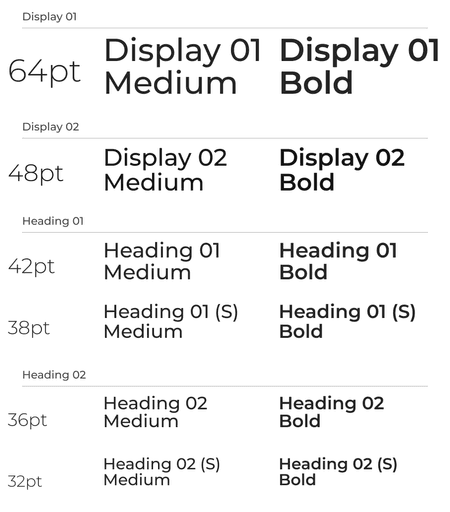
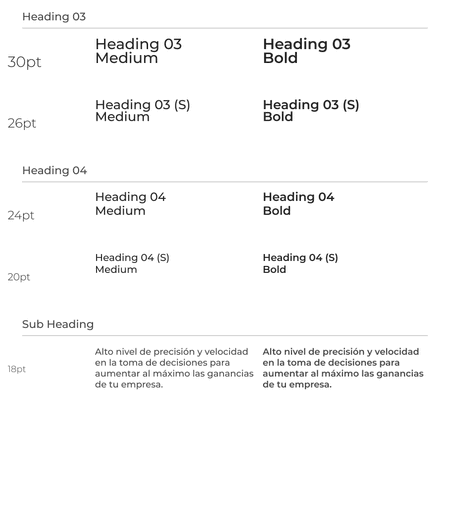
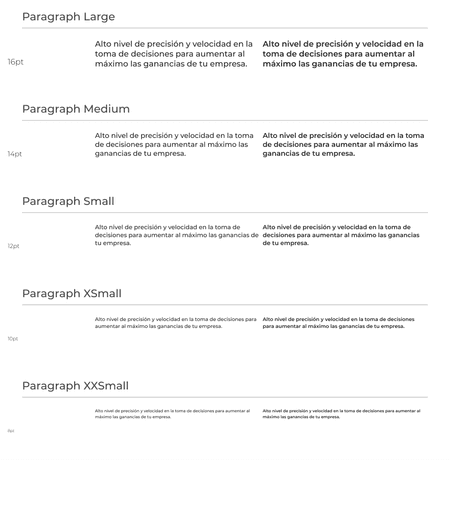
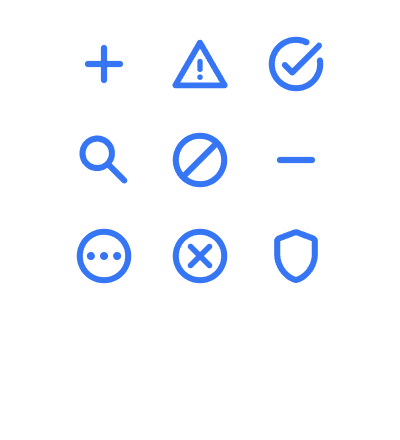
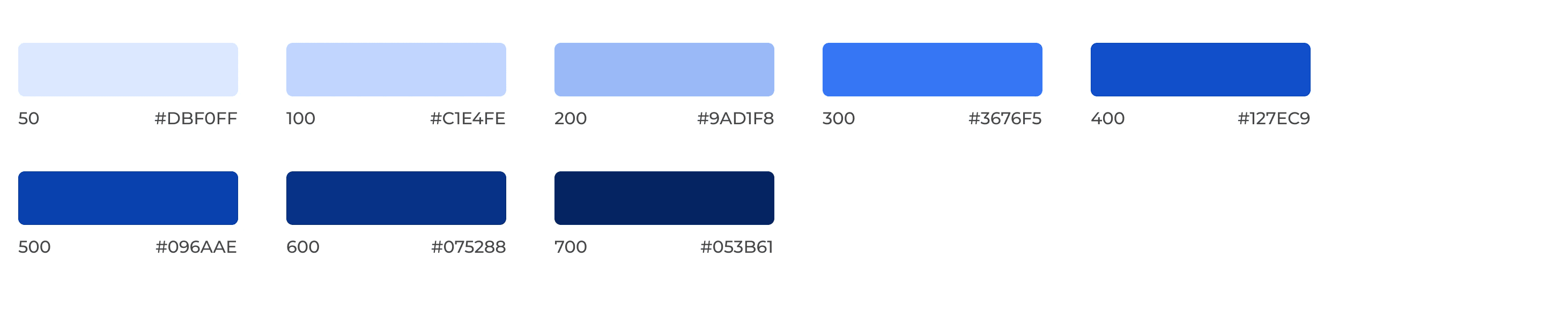
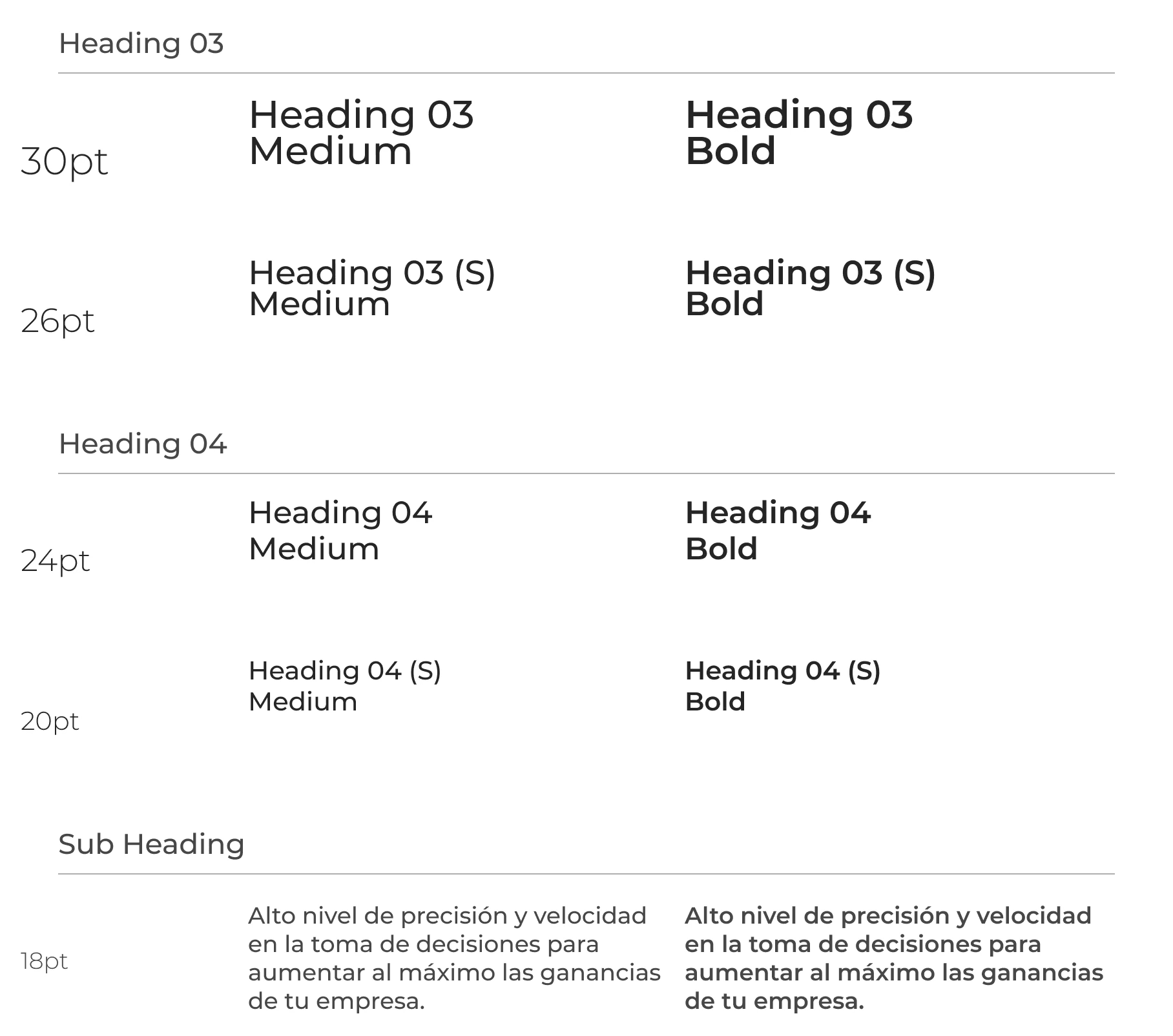
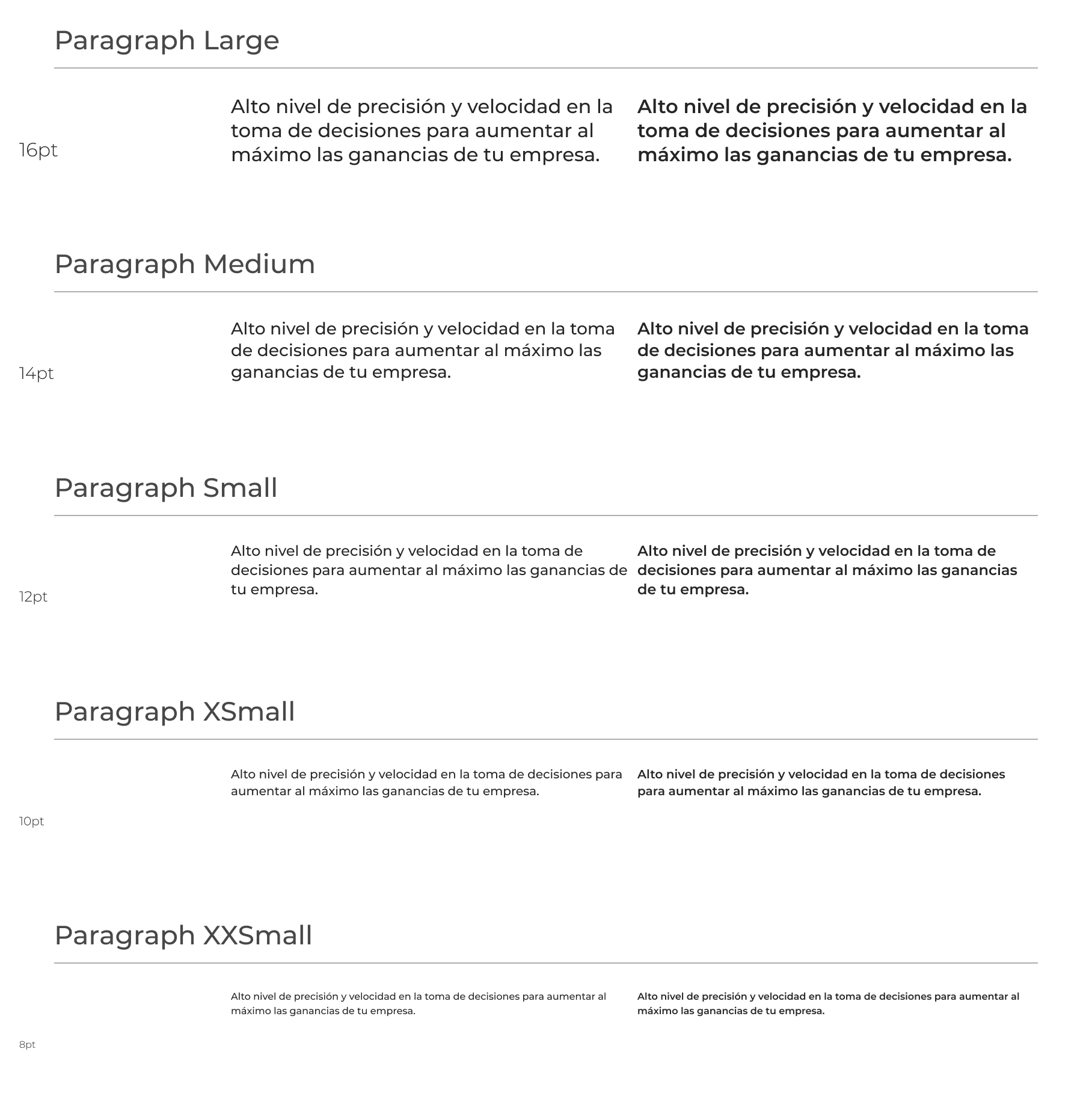
Atoms: Here's a detailed breakdown of the most basic level of the entire system, including colors, typography, icons, logos, and spacing. It's worth noting that the entire system was designed using an 8pt grid.
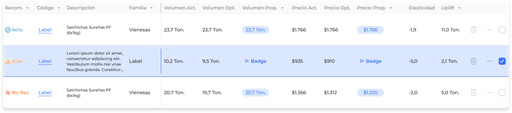
Molecules: This section includes small components that will be used across various sections, such as buttons, dropdown lists, table components, input fields, alerts, tooltips, etc.
Organisms: These are more specific and structured components, such as modals, alert screens, input modals or forms, etc. In this case, I created a dedicated section of components specifically for this application.

Atoms
Color System





Tipography
Montserrat
Icons
Contacto
Acciones
Flechas
Gráficos
Elementos
Símbolos

Molecules
Buttons
Default

Hover

Disabled

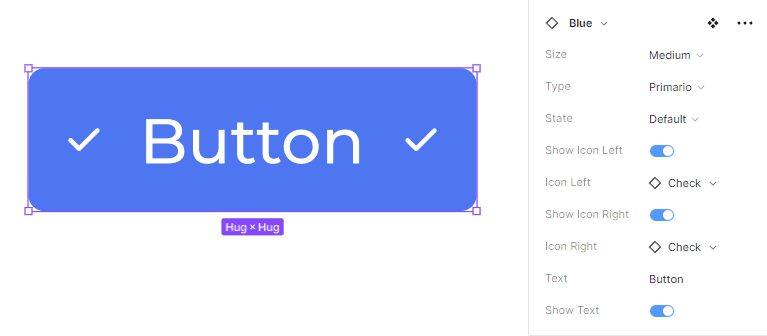
For the button I developed a component on figma that connected icons and allowed to do variations on top of the same element on a quick way.
Input
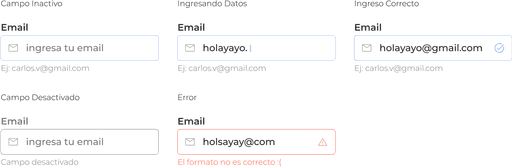
Table Cells

Organisms
Creation Module
Toolbar
Resume Card
Design System
The Design System I developed was based on the concept of Atomic Design, which organizes design components into atomic, molecular, and organism levels for reuse and coherence.
Below is a breakdown of what I included in each section:
Atoms: Here's a detailed breakdown of the most basic level of the entire system, including colors, typography, icons, logos, and spacing. It's worth noting that the entire system was designed using an 8pt grid.
Molecules: This section includes small components that will be used across various sections, such as buttons, dropdown lists, table components, input fields, alerts, tooltips, etc.
Organisms: These are more specific and structured components, such as modals, alert screens, input modals or forms, etc. In this case, I created a dedicated section of components specifically for this application.
Atoms
Color System




Tipography
Montserrat
Icons
Contacto
Acciones
Flechas
Gráficos
Elementos
Símbolos
Molecules
Buttons
Default
Hover
Disabled
For the button I developed a component on figma that connected icons and allowed to do variations on top of the same element on a quick way.
Input
Table Cells
Organisms
Creation Module
Toolbar
Resume Card
Design System
The Design System I developed was based on the concept of Atomic Design, which organizes design components into atomic, molecular, and organism levels for reuse and coherence.
Below is a breakdown of what I included in each section:
Atoms: Here's a detailed breakdown of the most basic level of the entire system, including colors, typography, icons, logos, and spacing. It's worth noting that the entire system was designed using an 8pt grid.
Molecules: This section includes small components that will be used across various sections, such as buttons, dropdown lists, table components, input fields, alerts, tooltips, etc.
Organisms: These are more specific and structured components, such as modals, alert screens, input modals or forms, etc. In this case, I created a dedicated section of components specifically for this application.
Atoms
Color System
Tipography
Montserrat
Icons
Contacto
Acciones
Flechas
Gráficos
Elementos
Símbolos
Molecules
Buttons
Default
Hover
Disabled
For the button I developed a component on figma that connected icons and allowed to do variations on top of the same element on a quick way.
Input
Table Cells
Organisms
Creation Module
Toolbar
Resume Card
Prototype
I used Figma for designing the prototypes, taking advantage of its user-friendly interface and its ability for seamless design-to-code transition.
Home
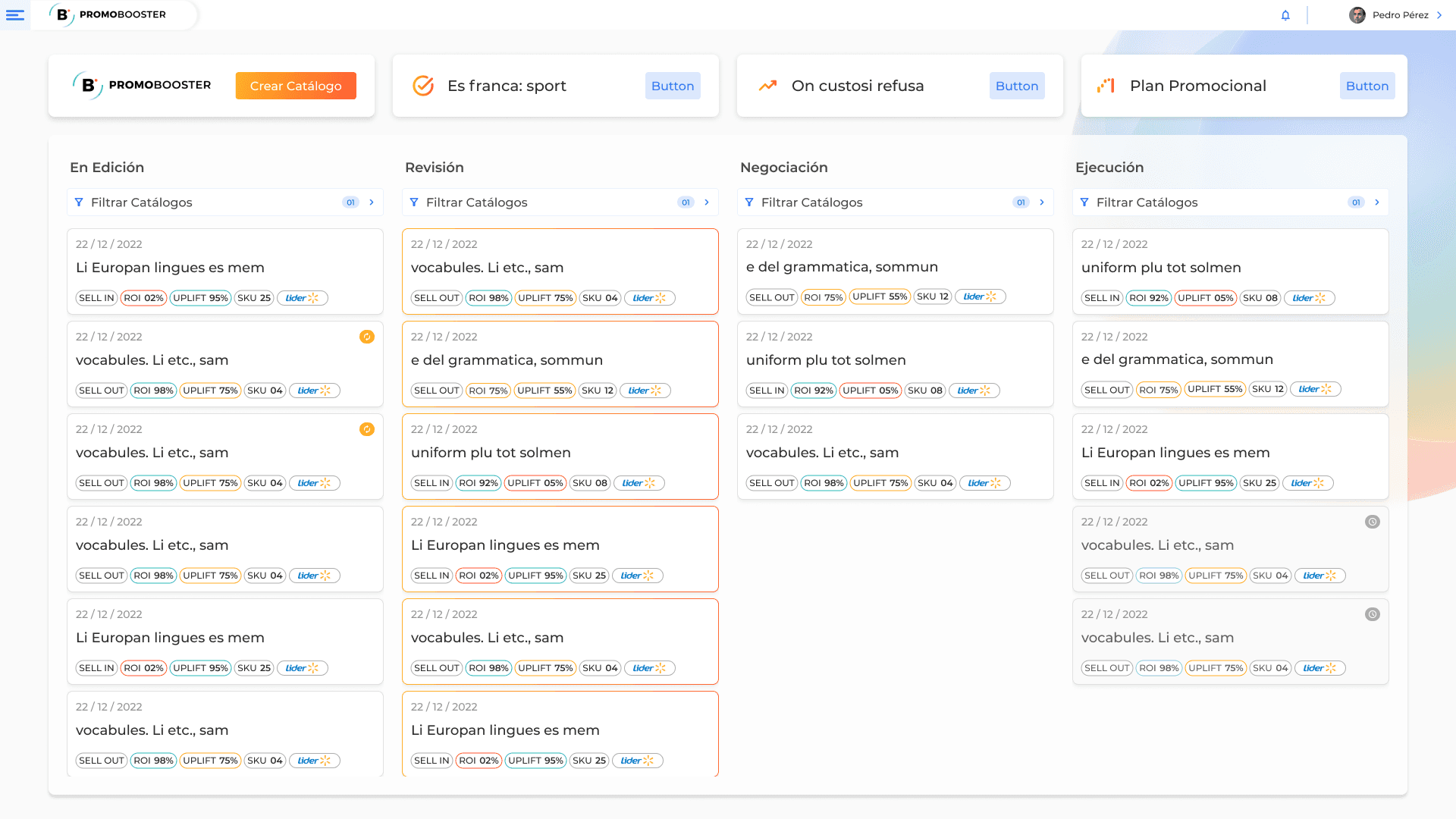
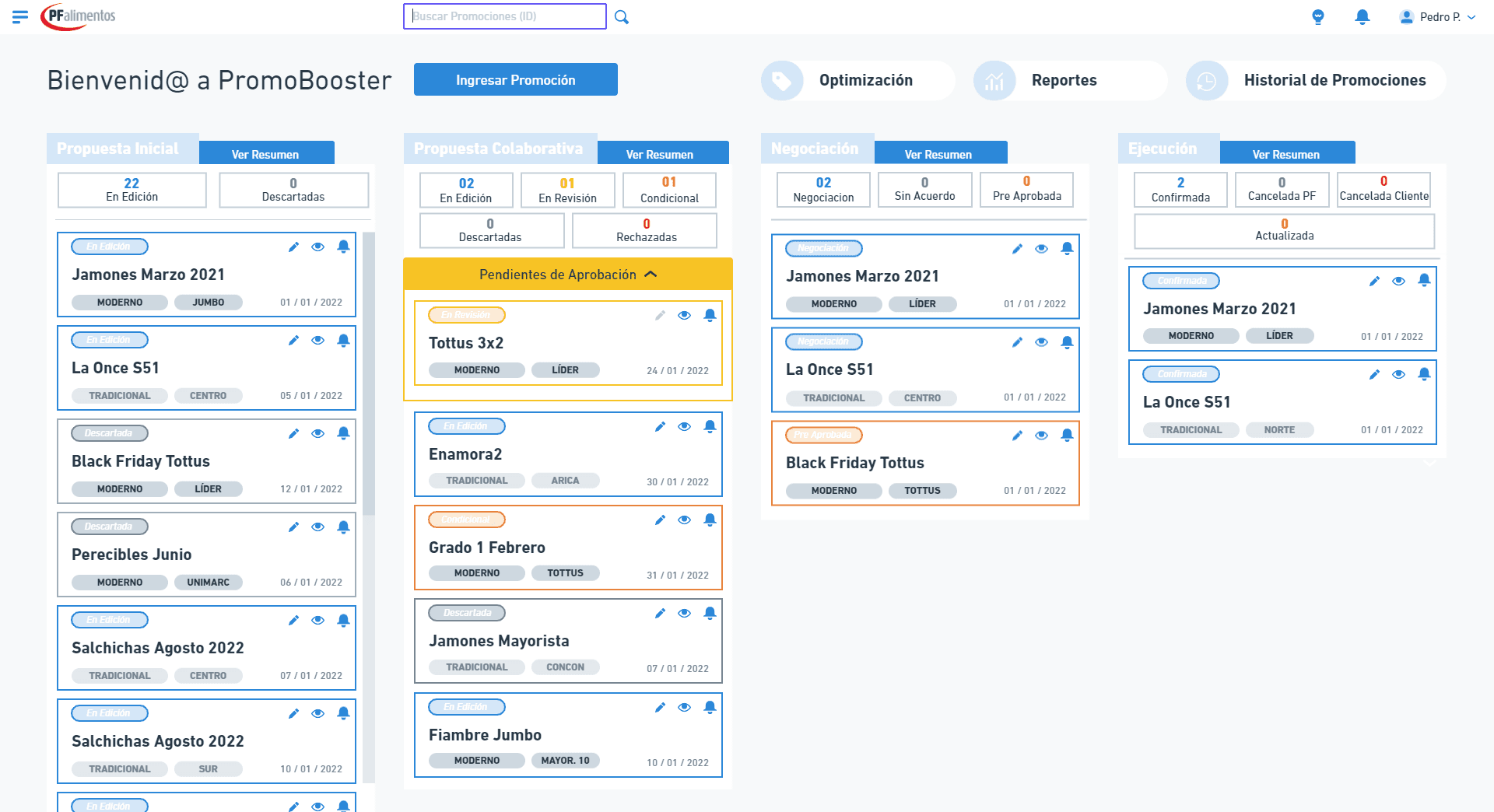
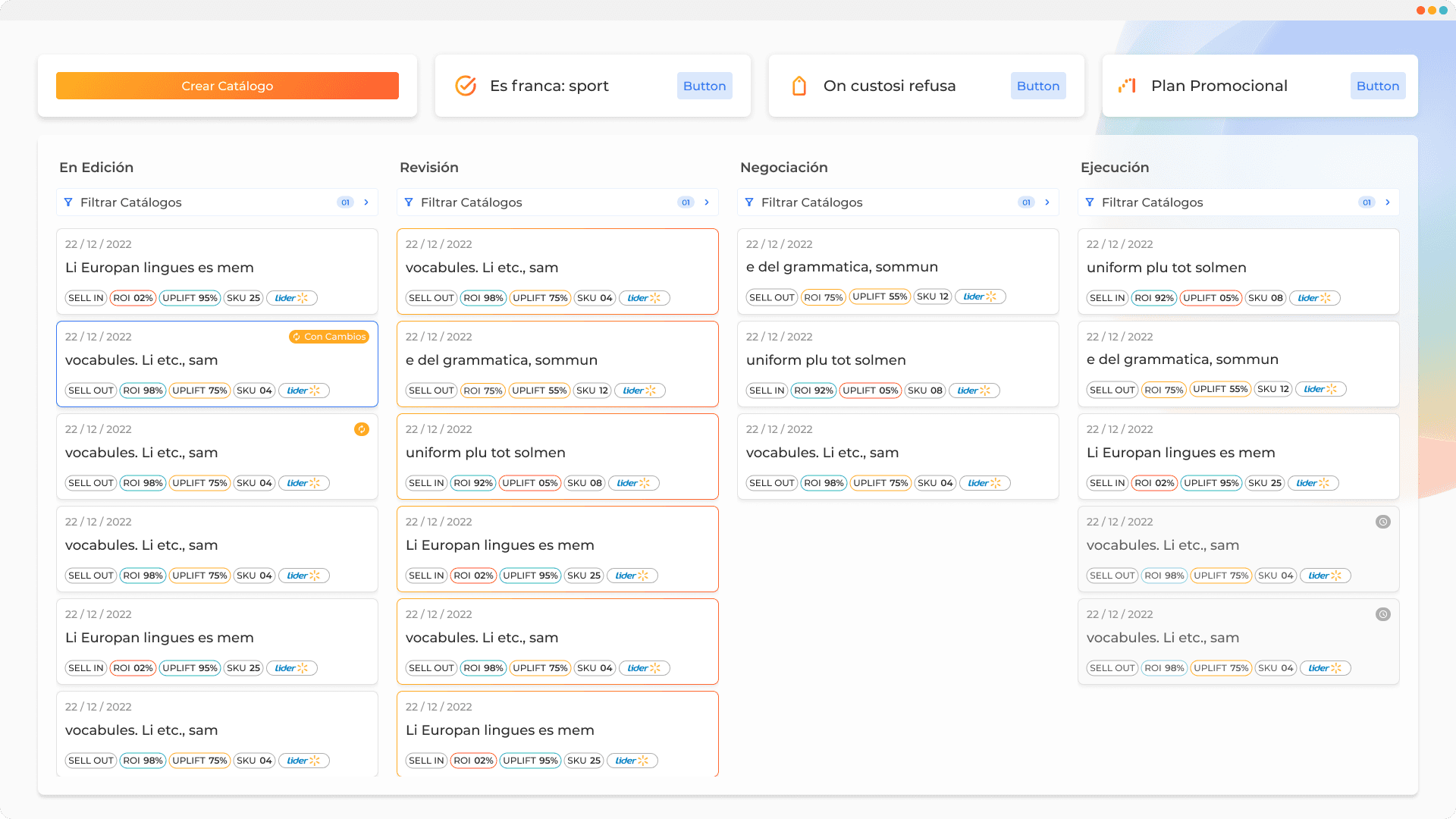
In the homepage, we maintained the structure outlined in the wireframes, with 4 columns where each potential client can organize their desired phases.
Each card within the columns represents a promotion or catalog, and features indicators for:
Promotion type, which can be sell-in or sell-out.
ROI and Uplift, performance indicators of the promotion.
SKU, the number of products entered in the promotion.
Targeted retail chain.
In the main section of each phase, we added a filter to easily locate promotions.
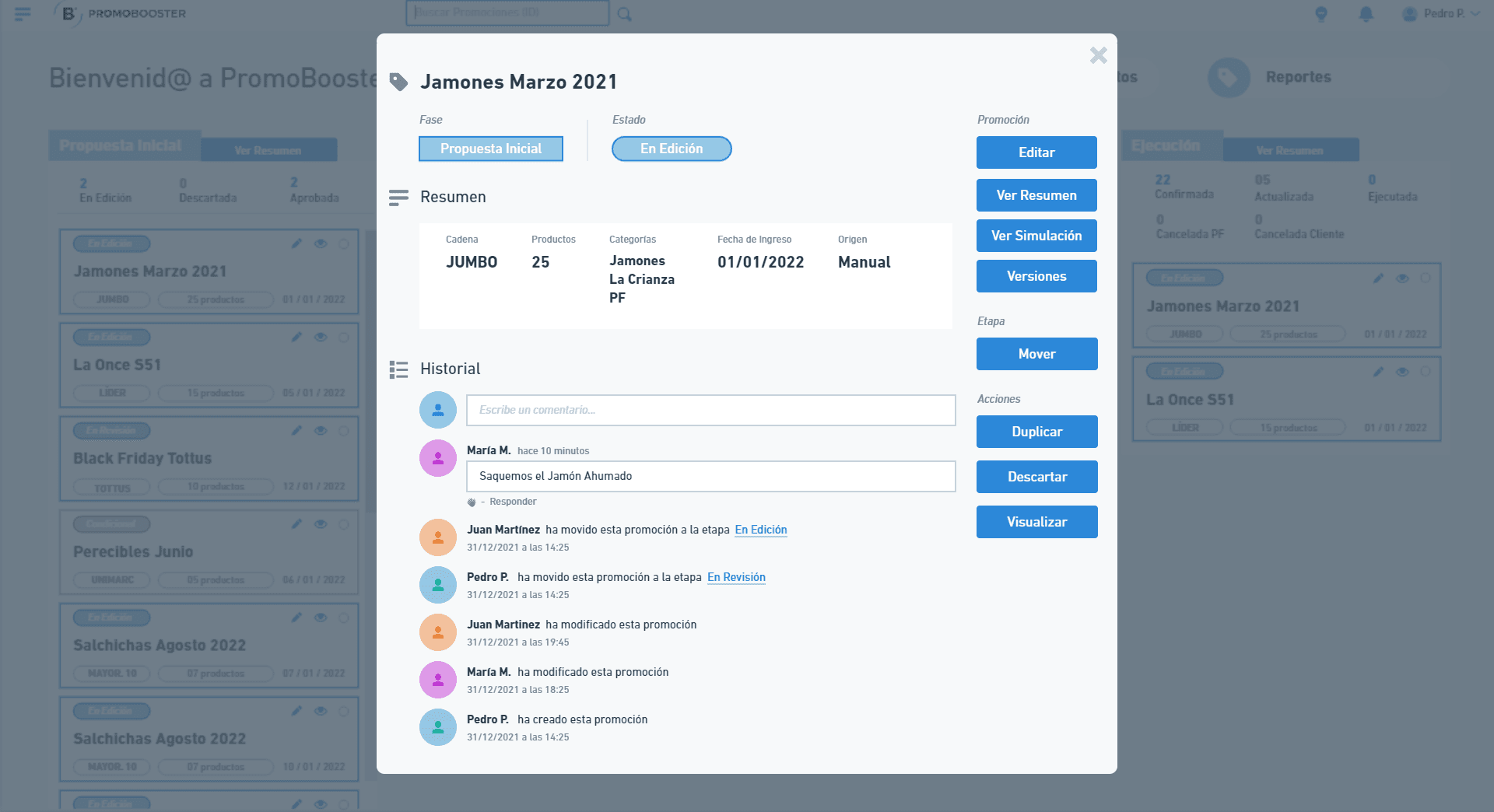
Resume Cards
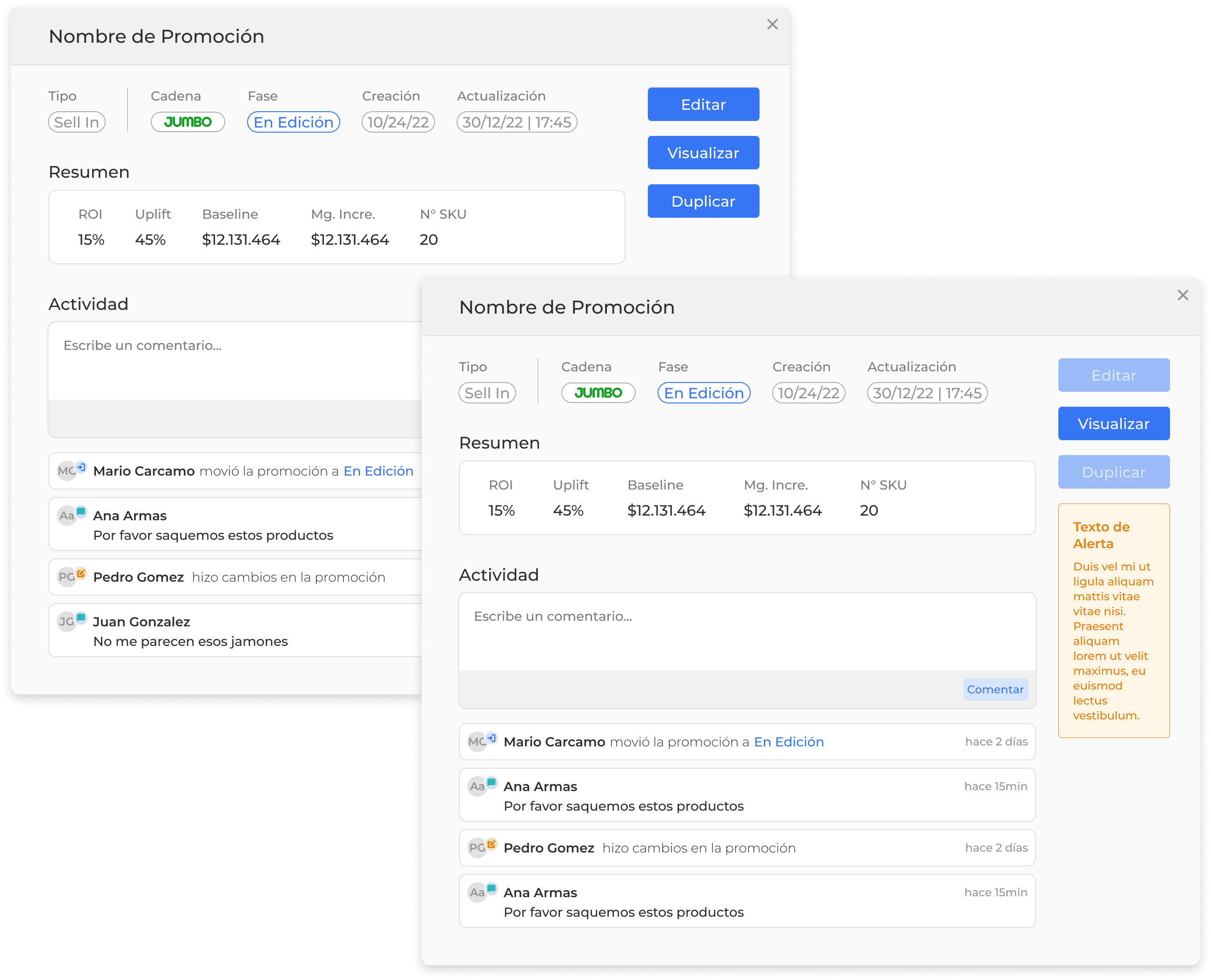
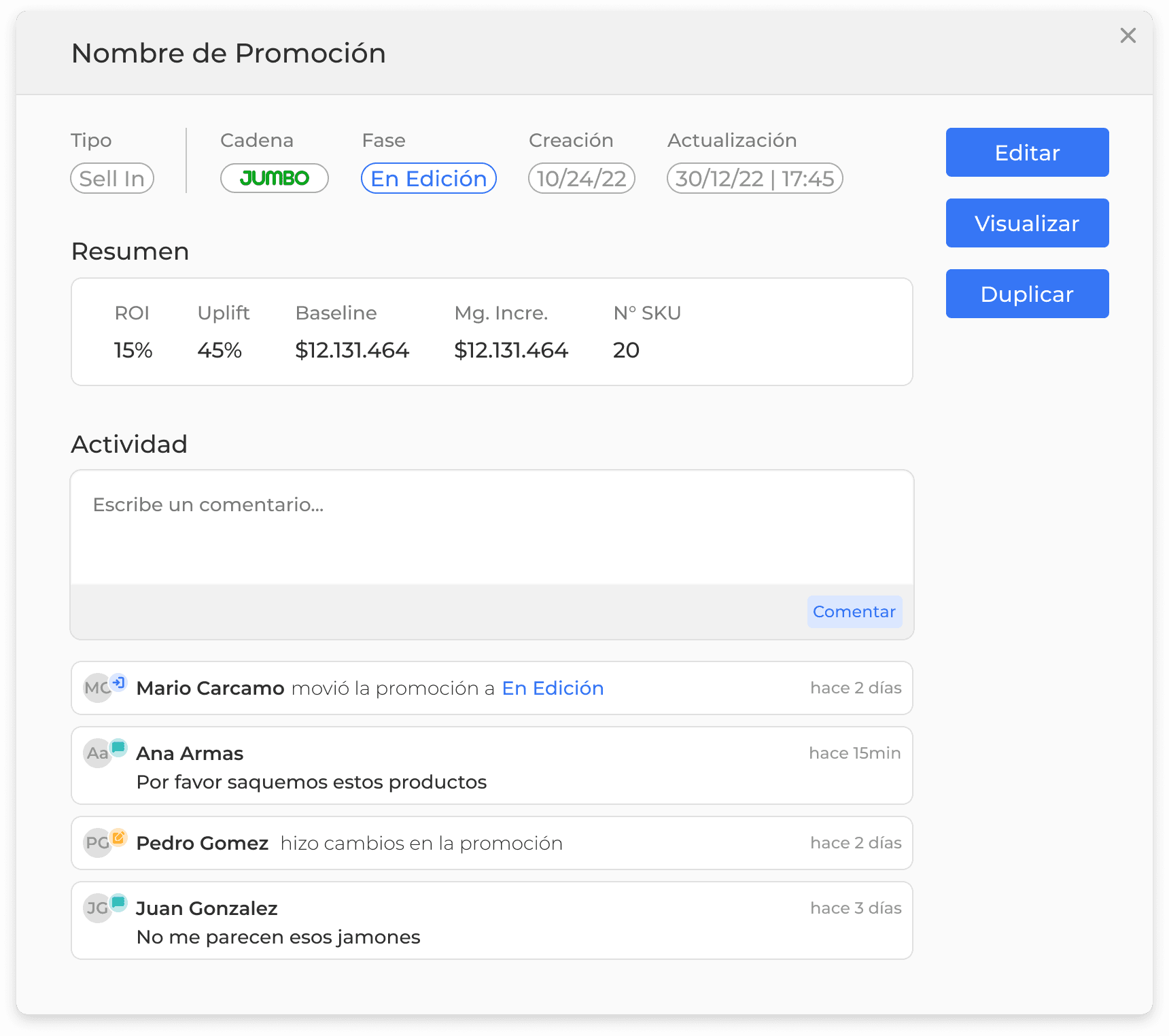
It contains a slightly more detailed summary of the promotion, buttons to access or duplicate it, and the latest activity it has had. This card is expanded by clicking on any of the cards on the home screen.
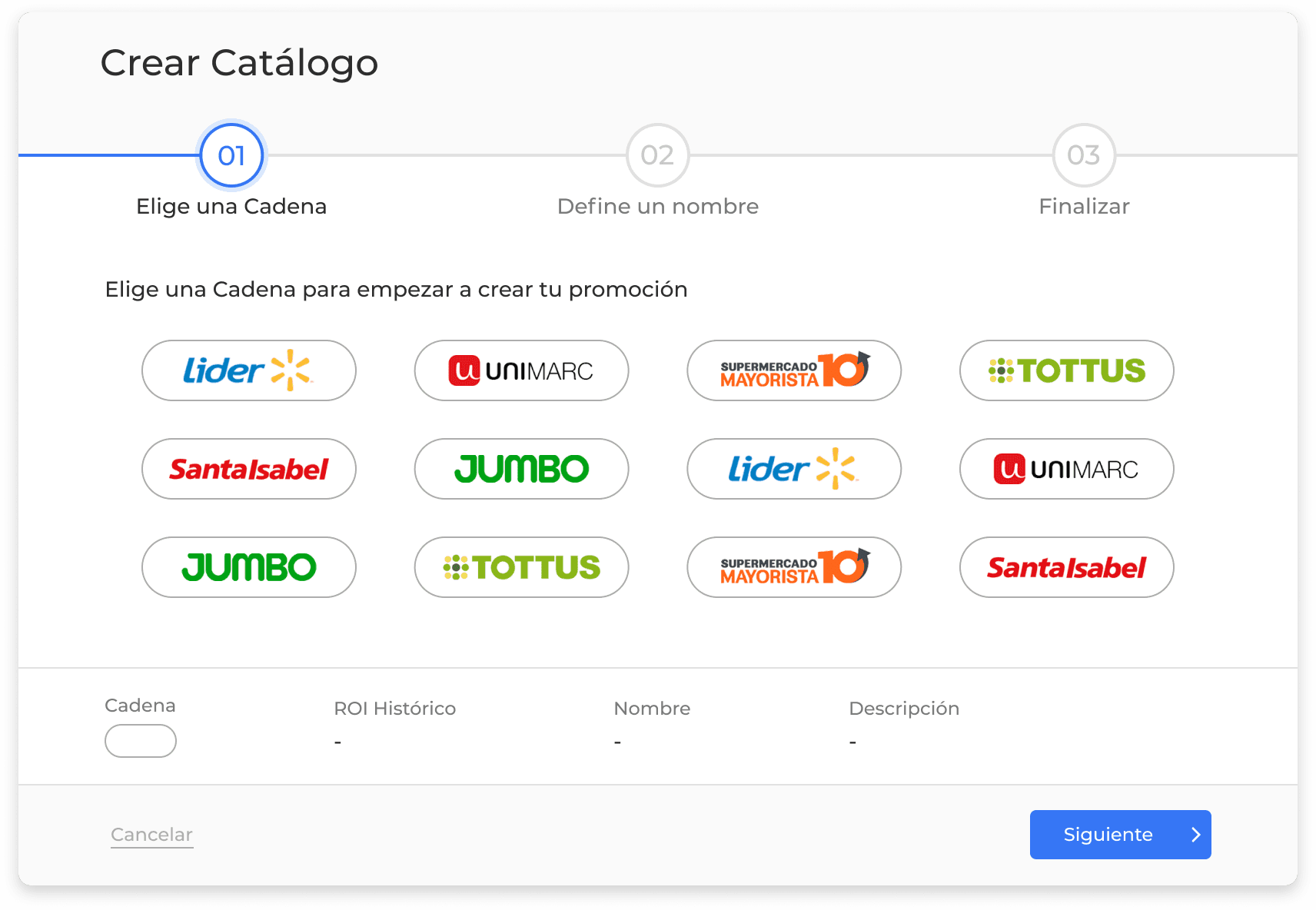
Creation Module
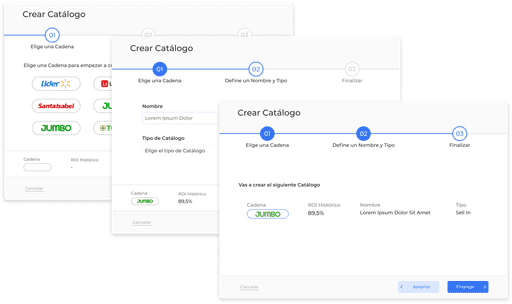
This module is the first step when creating a catalog or promotion.
Here, the user selects values that are not editable and indicate the data to be loaded from the backend for each promotion.
These data include the chain, name, and type of promotion.
It's a module that needs to be filled out step by step, with the possibility of expanding the steps in the future if necessary. It includes alerts that indicate to the user if they make a mistake or if they miss entering any values.
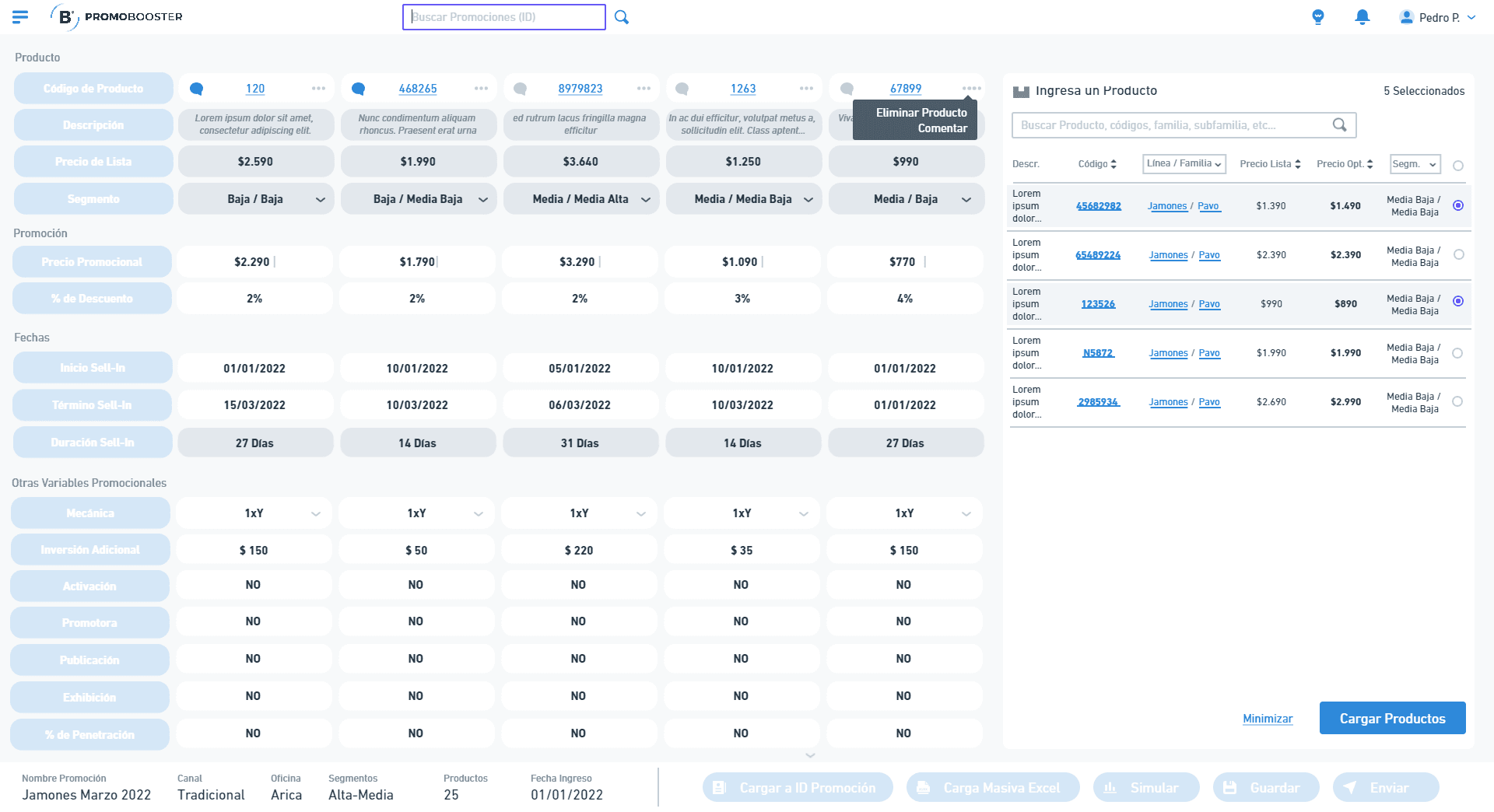
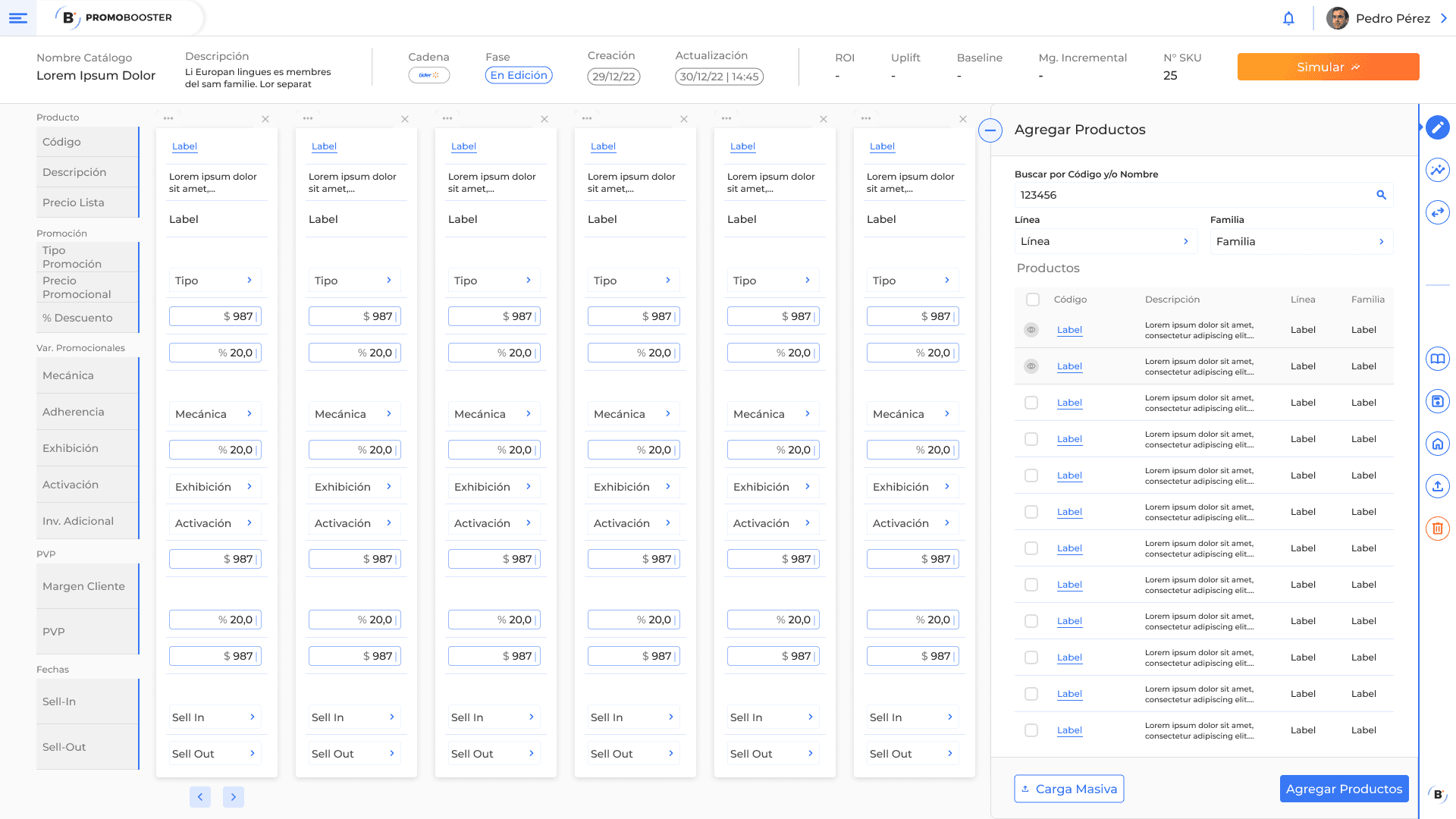
Promotion Editing
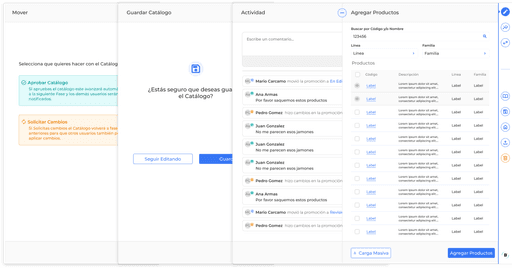
The products are loaded in column form, initially empty, and the user adds them from the toolbar on the right, which contains different sections.
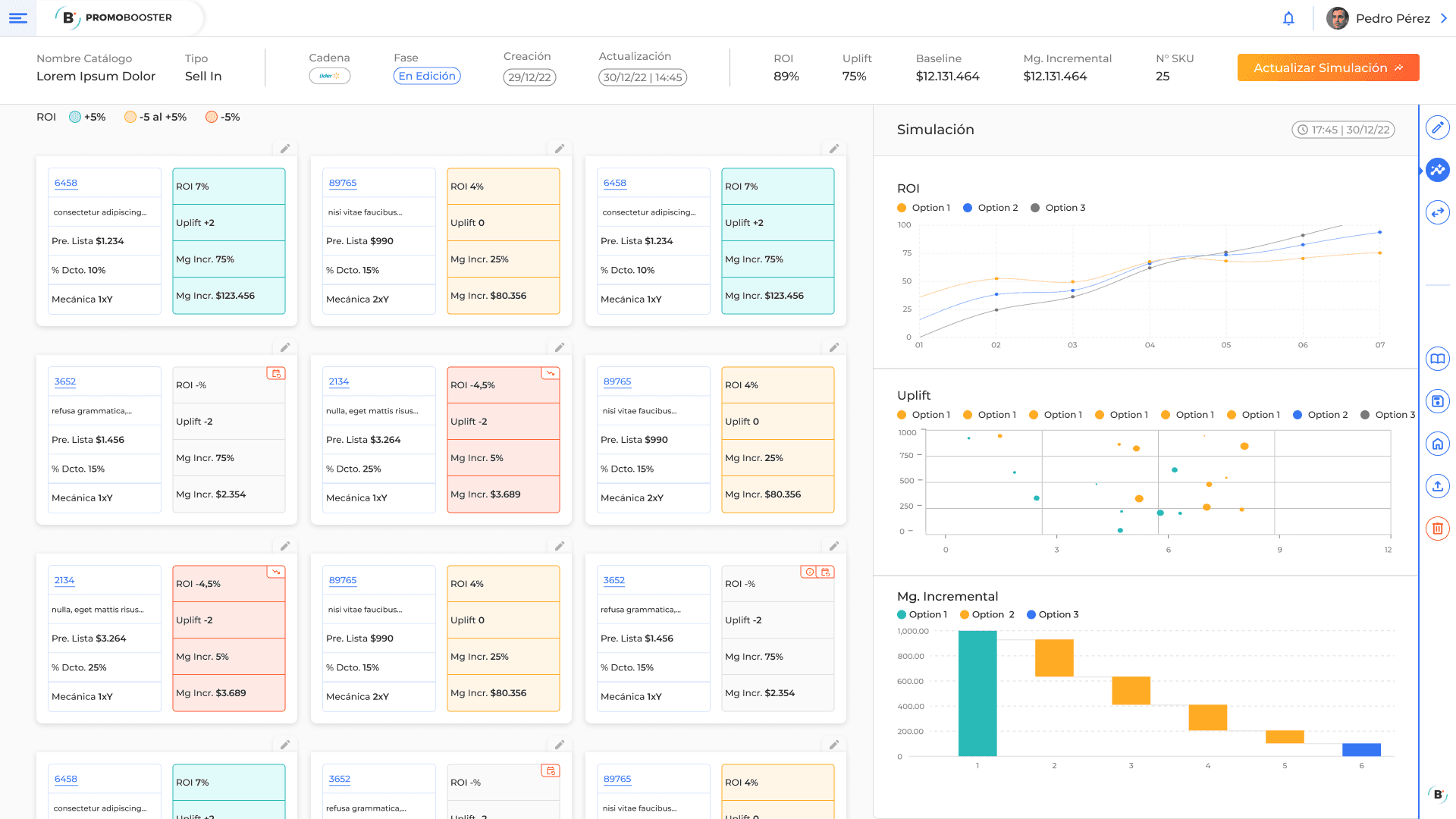
Catalog Simulation
In this view, the most valuable information of the application is displayed. Here, the simulation results are shown, both at the product level and the overall level. Additionally, we added indicators that display the quality of the results and highlight any errors that may have occurred.
Prototype
I used Figma for designing the prototypes, taking advantage of its user-friendly interface and its ability for seamless design-to-code transition.
Home
In the homepage, we maintained the structure outlined in the wireframes, with 4 columns where each potential client can organize their desired phases.
Each card within the columns represents a promotion or catalog, and features indicators for:
Promotion type, which can be sell-in or sell-out.
ROI and Uplift, performance indicators of the promotion.
SKU, the number of products entered in the promotion.
Targeted retail chain.
In the main section of each phase, we added a filter to easily locate promotions.
Resume Cards
It contains a slightly more detailed summary of the promotion, buttons to access or duplicate it, and the latest activity it has had. This card is expanded by clicking on any of the cards on the home screen.
Creation Module
This module is the first step when creating a catalog or promotion.
Here, the user selects values that are not editable and indicate the data to be loaded from the backend for each promotion.
These data include the chain, name, and type of promotion.
It's a module that needs to be filled out step by step, with the possibility of expanding the steps in the future if necessary. It includes alerts that indicate to the user if they make a mistake or if they miss entering any values.
Promotion Editing
The products are loaded in column form, initially empty, and the user adds them from the toolbar on the right, which contains different sections.
Catalog Simulation
In this view, the most valuable information of the application is displayed. Here, the simulation results are shown, both at the product level and the overall level. Additionally, we added indicators that display the quality of the results and highlight any errors that may have occurred.
Prototype
I used Figma for designing the prototypes, taking advantage of its user-friendly interface and its ability for seamless design-to-code transition.
Home
In the homepage, we maintained the structure outlined in the wireframes, with 4 columns where each potential client can organize their desired phases.
Each card within the columns represents a promotion or catalog, and features indicators for:
Promotion type, which can be sell-in or sell-out.
ROI and Uplift, performance indicators of the promotion.
SKU, the number of products entered in the promotion.
Targeted retail chain.
In the main section of each phase, we added a filter to easily locate promotions.
Resume Cards
It contains a slightly more detailed summary of the promotion, buttons to access or duplicate it, and the latest activity it has had. This card is expanded by clicking on any of the cards on the home screen.
Creation Module
This module is the first step when creating a catalog or promotion.
Here, the user selects values that are not editable and indicate the data to be loaded from the backend for each promotion.
These data include the chain, name, and type of promotion.
It's a module that needs to be filled out step by step, with the possibility of expanding the steps in the future if necessary. It includes alerts that indicate to the user if they make a mistake or if they miss entering any values.
Promotion Editing
The products are loaded in column form, initially empty, and the user adds them from the toolbar on the right, which contains different sections.
Catalog Simulation
In this view, the most valuable information of the application is displayed. Here, the simulation results are shown, both at the product level and the overall level. Additionally, we added indicators that display the quality of the results and highlight any errors that may have occurred.
Development
Being the Product Owner of the application was a significant part of my role in this project.
This led me to take on tasks such as:
Coordinating the front-end development with internal and external collaborators of the organization, providing files and documentation to facilitate the work of the developers.
Developing the product documentation or "Wiki," which would later be validated with stakeholders and the organization's CTO to establish a foundational reference point for all development decisions.
Collaborating with Data Engineers to ensure that the necessary data was made available to the Back-End team to fuel the application.
Defining sprints and tasks with clear acceptance criteria to achieve timely objectives.
Identifying the Minimum Viable Product (MVP), thus meeting tight development timelines by delivering initial versions of the product with well-developed essential functionalities.
Product Wiki
Product Wiki
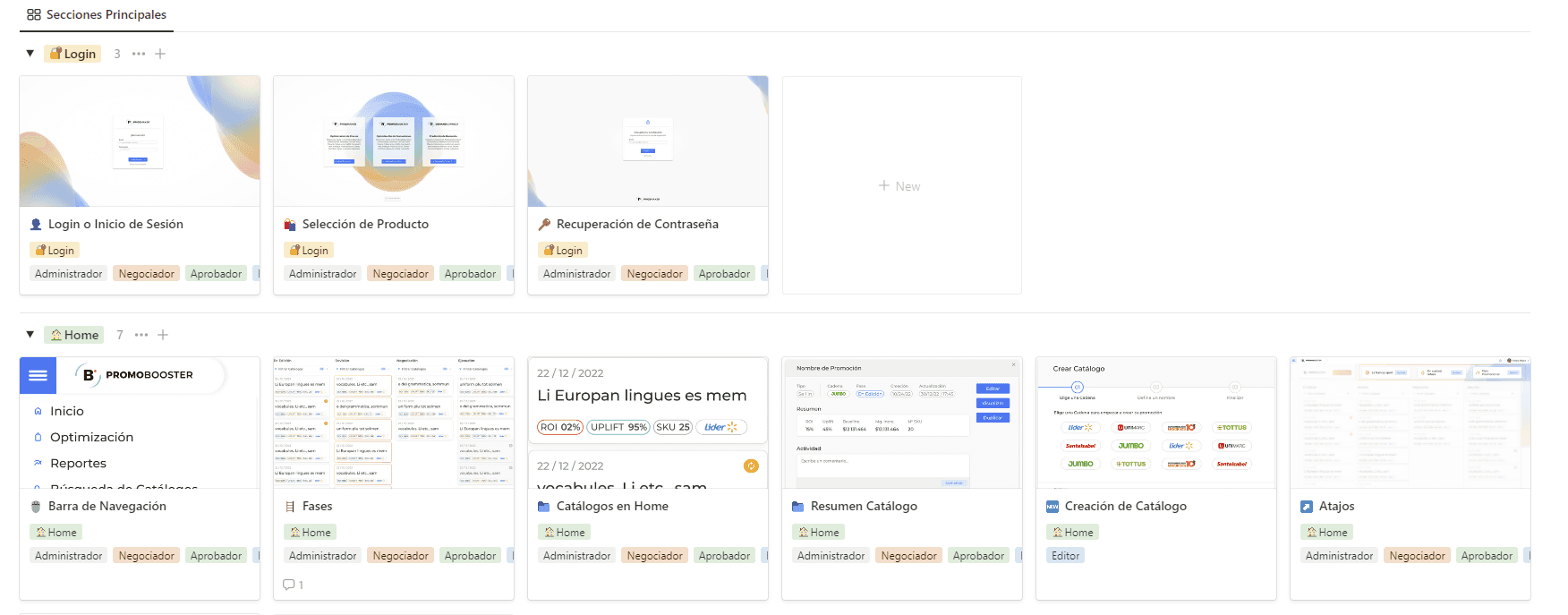
I developed a wiki that served as a comprehensive reference for information about every section of the platform.
This wiki wasn't intended for direct user use; rather, it was designed for the development team. I collaborated with relevant professionals to validate points that were beyond my scope, ensuring clarity and avoiding misunderstandings.
The wiki documented each section and outlined the behavior of each component, including when alerts should be triggered, the flow of phases, the Journey Map, and more.
It became our indispensable guide.
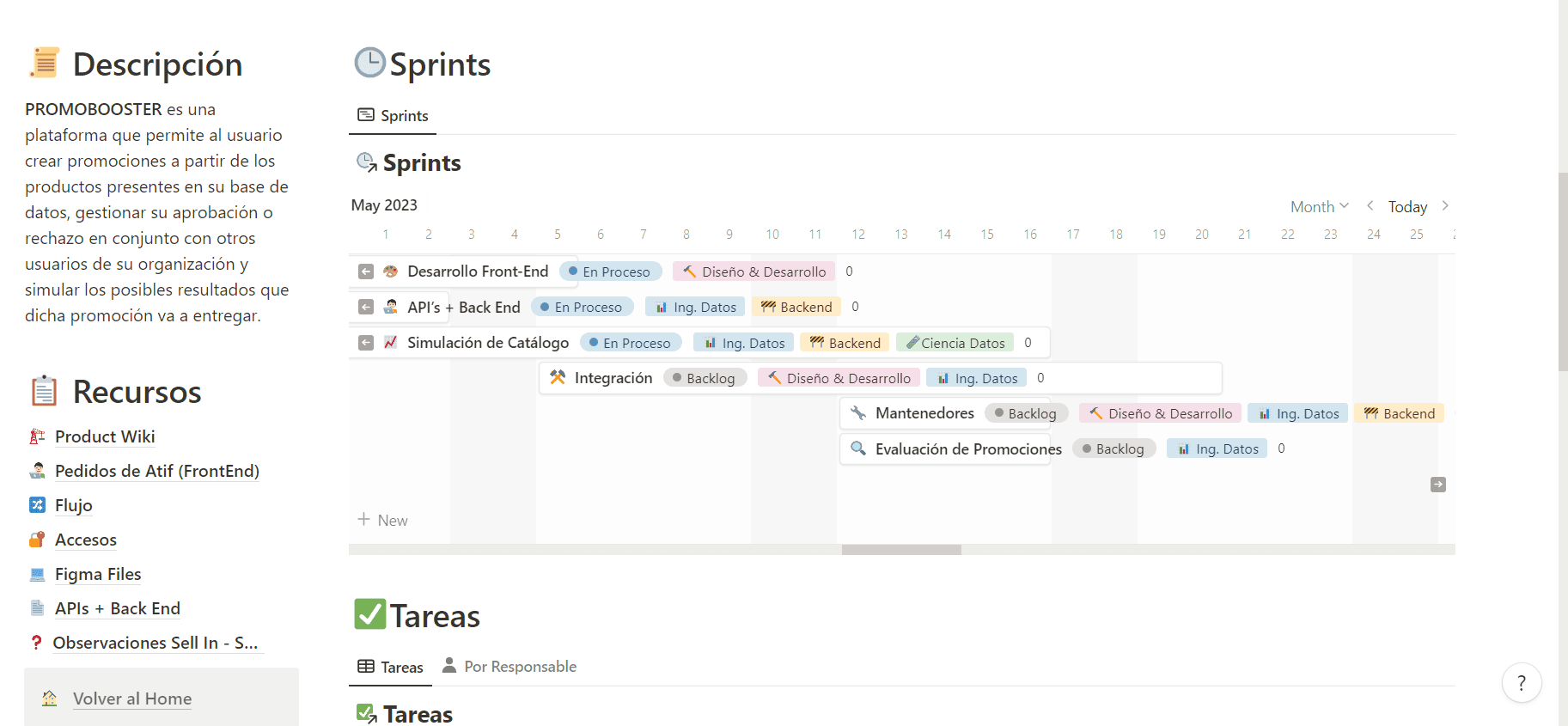
Sprints and Tasks
We utilized agile methodologies, employing sprints, tasks, and Kanban boards. In addition, we held daily stand-up meetings to stay updated and coordinate upcoming tasks.
I took charge of drafting all the tasks, specifying their estimated effort, assigning responsible teams, determining their significance in alignment with project objectives, and setting acceptance criteria.
It's worth noting that these processes weren't initially in place, and I was among those who advocated for their implementation in this project.
Deliverables and Comment Reception
We made gradual deliveries to both the organization's CEO and a client awaiting the product.
We initiated with an MVP and subsequently added features and sections, all while gathering feedback from both parties.
I took in these feedback inputs, assessed their significance, and transformed them into tasks for future work.
This iterative process ensured that we continuously improved the product based on real-world feedback and evolving requirements.
Conclusion
This project was highly intense, both in terms of complexity and time constraints. While it's not yet closed, I can't provide definitive conclusions. However, the reception from users has been overwhelmingly positive, particularly in the sense that it has led to extensions of working agreements with various clients. These clients are motivated to continue growing the application further.
The work done so far has inspired existing users to explore more software solutions in the pricing domain, and to me, that's a significant success.
Personally, I can conclude that this project has been a significant professional boost for me, allowing me to excel in both the roles of a product designer and a product owner. I hope to continue participating in projects of this nature in the future.
Development
Being the Product Owner of the application was a significant part of my role in this project.
This led me to take on tasks such as:
Coordinating the front-end development with internal and external collaborators of the organization, providing files and documentation to facilitate the work of the developers.
Developing the product documentation or "Wiki," which would later be validated with stakeholders and the organization's CTO to establish a foundational reference point for all development decisions.
Collaborating with Data Engineers to ensure that the necessary data was made available to the Back-End team to fuel the application.
Defining sprints and tasks with clear acceptance criteria to achieve timely objectives.
Identifying the Minimum Viable Product (MVP), thus meeting tight development timelines by delivering initial versions of the product with well-developed essential functionalities.
Product Wiki
Product Wiki
I developed a wiki that served as a comprehensive reference for information about every section of the platform.
This wiki wasn't intended for direct user use; rather, it was designed for the development team. I collaborated with relevant professionals to validate points that were beyond my scope, ensuring clarity and avoiding misunderstandings.
The wiki documented each section and outlined the behavior of each component, including when alerts should be triggered, the flow of phases, the Journey Map, and more.
It became our indispensable guide.
Sprints and Tasks
We utilized agile methodologies, employing sprints, tasks, and Kanban boards. In addition, we held daily stand-up meetings to stay updated and coordinate upcoming tasks.
I took charge of drafting all the tasks, specifying their estimated effort, assigning responsible teams, determining their significance in alignment with project objectives, and setting acceptance criteria.
It's worth noting that these processes weren't initially in place, and I was among those who advocated for their implementation in this project.
Deliverables and Comment Reception
We made gradual deliveries to both the organization's CEO and a client awaiting the product.
We initiated with an MVP and subsequently added features and sections, all while gathering feedback from both parties.
I took in these feedback inputs, assessed their significance, and transformed them into tasks for future work.
This iterative process ensured that we continuously improved the product based on real-world feedback and evolving requirements.
Conclusion
This project was highly intense, both in terms of complexity and time constraints. While it's not yet closed, I can't provide definitive conclusions. However, the reception from users has been overwhelmingly positive, particularly in the sense that it has led to extensions of working agreements with various clients. These clients are motivated to continue growing the application further.
The work done so far has inspired existing users to explore more software solutions in the pricing domain, and to me, that's a significant success.
Personally, I can conclude that this project has been a significant professional boost for me, allowing me to excel in both the roles of a product designer and a product owner. I hope to continue participating in projects of this nature in the future.
Development
Being the Product Owner of the application was a significant part of my role in this project.
This led me to take on tasks such as:
Coordinating the front-end development with internal and external collaborators of the organization, providing files and documentation to facilitate the work of the developers.
Developing the product documentation or "Wiki," which would later be validated with stakeholders and the organization's CTO to establish a foundational reference point for all development decisions.
Collaborating with Data Engineers to ensure that the necessary data was made available to the Back-End team to fuel the application.
Defining sprints and tasks with clear acceptance criteria to achieve timely objectives.
Identifying the Minimum Viable Product (MVP), thus meeting tight development timelines by delivering initial versions of the product with well-developed essential functionalities.
Product Wiki
Product Wiki
I developed a wiki that served as a comprehensive reference for information about every section of the platform.
This wiki wasn't intended for direct user use; rather, it was designed for the development team. I collaborated with relevant professionals to validate points that were beyond my scope, ensuring clarity and avoiding misunderstandings.
The wiki documented each section and outlined the behavior of each component, including when alerts should be triggered, the flow of phases, the Journey Map, and more.
It became our indispensable guide.
Sprints and Tasks
We utilized agile methodologies, employing sprints, tasks, and Kanban boards. In addition, we held daily stand-up meetings to stay updated and coordinate upcoming tasks.
I took charge of drafting all the tasks, specifying their estimated effort, assigning responsible teams, determining their significance in alignment with project objectives, and setting acceptance criteria.
It's worth noting that these processes weren't initially in place, and I was among those who advocated for their implementation in this project.
Deliverables and Comment Reception
We made gradual deliveries to both the organization's CEO and a client awaiting the product.
We initiated with an MVP and subsequently added features and sections, all while gathering feedback from both parties.
I took in these feedback inputs, assessed their significance, and transformed them into tasks for future work.
This iterative process ensured that we continuously improved the product based on real-world feedback and evolving requirements.
Conclusion
This project was highly intense, both in terms of complexity and time constraints. While it's not yet closed, I can't provide definitive conclusions. However, the reception from users has been overwhelmingly positive, particularly in the sense that it has led to extensions of working agreements with various clients. These clients are motivated to continue growing the application further.
The work done so far has inspired existing users to explore more software solutions in the pricing domain, and to me, that's a significant success.
Personally, I can conclude that this project has been a significant professional boost for me, allowing me to excel in both the roles of a product designer and a product owner. I hope to continue participating in projects of this nature in the future.